Our Three Step Process

The Funnel Operating System™ Resource Hub
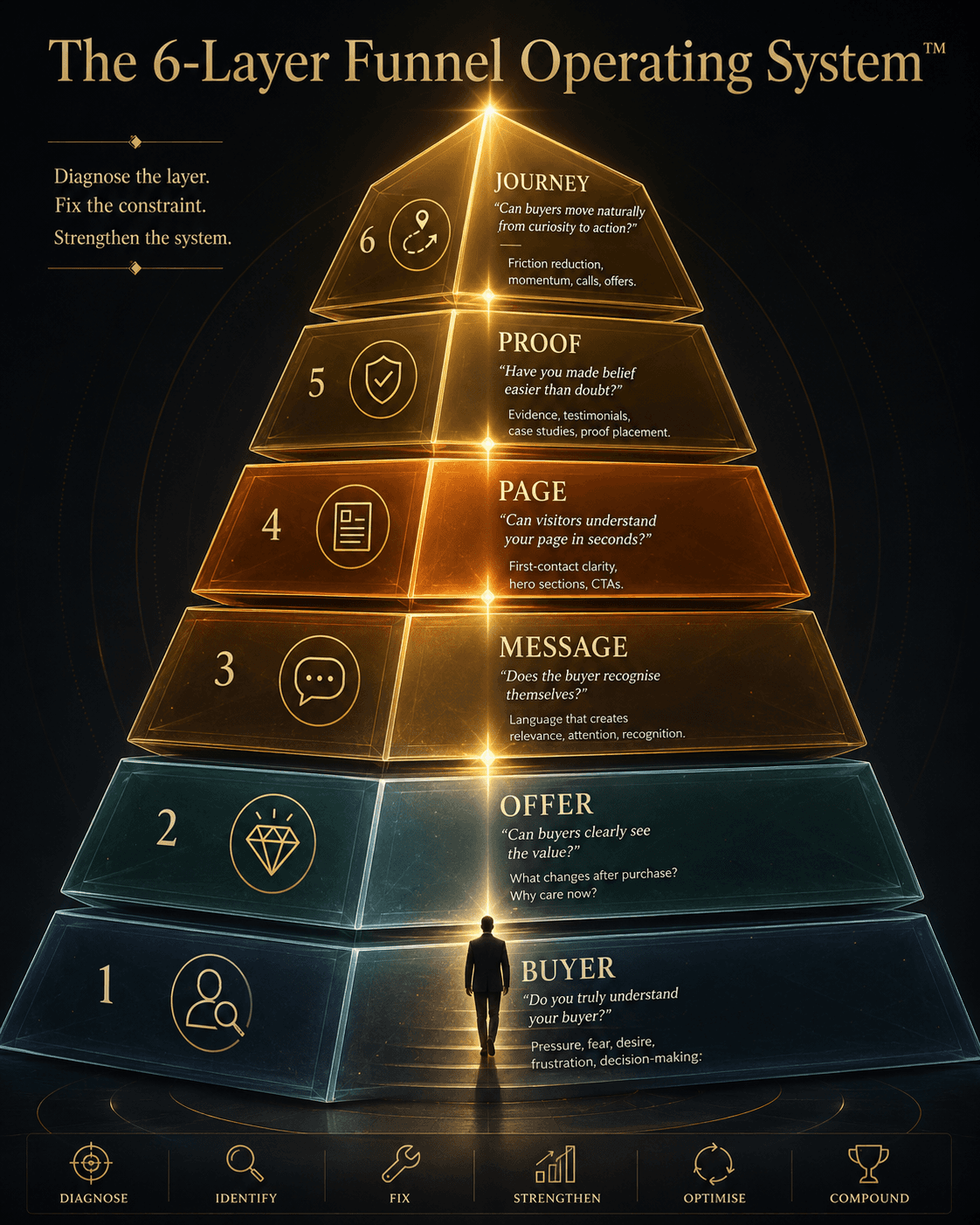
“The 6-Layer Funnel Operating System™” Concept: A majestic, vertical 6-layer pyramid or tower visualization. Each layer represents one growth layer, with a distinct color, icon, and core question:  Layer 1 (Base — Buyer): “Do you truly understand your buyer?” — Cool grey/blue — Pressure, fear, desire, frustration, decision-making.  Layer 2 (Offer): “Can buyers clearly see the value?” — Soft teal — What changes after purchase? Why care now?  Layer 3 (Message): “Does the buyer recognise themselves?” — Warm amber — Language that creates relevance, attention, recognition.  Layer 4 (Page): “Can visitors understand your page in seconds?” — Deep orange — First-contact clarity, hero sections, CTAs.  Layer 5 (Proof): “Have you made belief easier than doubt?” — Dark gold — Evidence, testimonials, case studies, proof placement.  Layer 6 (Top — Journey): “Can buyers move naturally from curiosity to action?” — Glowing bright gold — Friction reduction, momentum, calls, offers.  A small silhouette ascends from Layer 1 to Layer 6. At each layer, a beam of light illuminates the core question. A label on the side: “The Funnel Operating System™ — Diagnose the layer. Fix the constraint. Strengthen the system.”  Style: Architectural pyramid/tower meets luxury UI. Dark charcoal background, glass-morphism, gradient from cool grey/blue to bright gold. Thin gold connecting lines. The silhouette is minimalist, elegant.  Interaction: Hovering any layer expands a detailed summary of that layer, including the diagnostic question, key resources from the hub, and a link to explore. Clicking the layer navigates to the corresponding resource section. A slider lets the user “ascend” from Buyer to Journey, seeing how each layer enables the next.

Our Three Step Process

The Funnel Operating System™ Resource Hub

“The 6-Layer Funnel Operating System™” Concept: A majestic, vertical 6-layer pyramid or tower visualization. Each layer represents one growth layer, with a distinct color, icon, and core question:  Layer 1 (Base — Buyer): “Do you truly understand your buyer?” — Cool grey/blue — Pressure, fear, desire, frustration, decision-making.  Layer 2 (Offer): “Can buyers clearly see the value?” — Soft teal — What changes after purchase? Why care now?  Layer 3 (Message): “Does the buyer recognise themselves?” — Warm amber — Language that creates relevance, attention, recognition.  Layer 4 (Page): “Can visitors understand your page in seconds?” — Deep orange — First-contact clarity, hero sections, CTAs.  Layer 5 (Proof): “Have you made belief easier than doubt?” — Dark gold — Evidence, testimonials, case studies, proof placement.  Layer 6 (Top — Journey): “Can buyers move naturally from curiosity to action?” — Glowing bright gold — Friction reduction, momentum, calls, offers.  A small silhouette ascends from Layer 1 to Layer 6. At each layer, a beam of light illuminates the core question. A label on the side: “The Funnel Operating System™ — Diagnose the layer. Fix the constraint. Strengthen the system.”  Style: Architectural pyramid/tower meets luxury UI. Dark charcoal background, glass-morphism, gradient from cool grey/blue to bright gold. Thin gold connecting lines. The silhouette is minimalist, elegant.  Interaction: Hovering any layer expands a detailed summary of that layer, including the diagnostic question, key resources from the hub, and a link to explore. Clicking the layer navigates to the corresponding resource section. A slider lets the user “ascend” from Buyer to Journey, seeing how each layer enables the next.

Diagnose the layer. Fix the constraint. Strengthen the system.

Most businesses don’t have a traffic problem.

They have an operating system problem.

Growth does not usually break because of one bad ad, one weak headline, one poor CTA, or one underperforming page.

Those are symptoms.

The real problem usually lives deeper.

Inside the system.

The Funnel Operating System™ exists to help founders, operators, agencies, consultants, and service businesses diagnose the hidden layers that determine whether growth happens or stalls.

Every business has six growth layers:

  • Buyer

  • Offer

  • Message

  • Page

  • Proof

  • Journey


Each layer creates the conditions required for the next.

  • The Buyer Layer creates understanding.

  • The Offer Layer creates desire.

  • The Message Layer creates recognition.

  • The Page Layer creates comprehension.

  • The Proof Layer creates trust.

  • The Journey Layer creates momentum.

  • And momentum creates growth.

  • Growth creates scale.

  • Scale creates freedom.

That is the purpose of this Resource Hub.

Not to give you more random marketing tactics.

Not to bury you in templates.

Not to hand you another checklist that collects dust.

This hub exists to help you find the weak layer, repair the constraint, and build a stronger Funnel Operating System™.

——


Start Here

If you’re not sure which layer is limiting growth, begin with the foundational guides below.


Why Growth Isn’t Happening™

A founder’s guide to diagnosing growth problems before they become expensive.

Use this first if you want to understand why traffic, leads, conversions, and sales problems are often symptoms of a deeper system issue.

Download the guide (here).


The Funnel Operating System™ Diagnostic Handbook

A deeper manual for identifying hidden growth constraints inside the six layers of the Funnel Operating System™.

Use this if you want to examine your business like a diagnostician, not a gambler.

Read the handbook.


The Six Layers


1) Buyer Layer™

Question:

Do you truly understand your buyer?

This layer helps you understand the pressure, fear, desire, frustration, and decision-making process behind your buyer.

Start here if your messaging feels generic, your audience feels vague, or your leads are not converting.

Explore Buyer Resources.


2) Offer Layer™

Question:

Can buyers clearly see the value?

This layer helps you sharpen what you sell, why it matters, what changes after purchase, and why buyers should care now.

Start here if people say “interesting” but don’t buy.

Explore Offer Resources.


3) Message Layer™

Question:

Does the buyer recognise themselves?

This layer helps you turn buyer understanding into language that creates relevance, attention, and recognition.

Start here if your content gets ignored or your headline feels flat.

Explore Message Resources.


4) Page Layer™

Question:

Can visitors understand your page in seconds?

This layer helps you fix first-contact clarity, hero sections, CTAs, page structure, and buyer comprehension.

Start here if your landing page gets traffic but weak conversion.

Explore Page Resources.


5) Proof Layer™

Question:

Have you made belief easier than doubt?

This layer helps you build trust through evidence, testimonials, case studies, demonstrations, screenshots, and proof placement.

Start here if prospects hesitate, doubt, or say “I’ll think about it.”

Explore Proof Resources.


6) Journey Layer™

Question:

Can buyers move naturally from curiosity to action?

This layer helps you reduce friction between steps and create momentum across your funnel, emails, content, resources, calls, and offers.

Start here if people engage but disappear before taking action.

Explore Journey Resources.

——


How To Use This Hub

Do not try to fix everything at once.

That is how founders create a Frankenstein mess.

Start with the layer that feels weakest.

  1. Read the article.

  2. Download the resource.

  3. Apply one fix.

  4. Then move to the next layer.


The goal is not perfection.

The goal is alignment.

When the Buyer Layer becomes stronger, the Offer becomes easier.

When the Offer becomes stronger, the Message becomes sharper.

When the Message becomes sharper, the Page becomes clearer.

When the Page becomes clearer, Proof works harder.

When Proof works harder, the Journey moves faster.

And when the Journey creates momentum, growth becomes easier.

Not because you found a hack.

Because the system became stronger.

——


The Core Principle

Most businesses don’t need more traffic.

They need a better operating system.

A skill creates income.

A system creates scale.

An operating system creates freedom.

Welcome to the Funnel Operating SystemResource Hub.

Join our newsletter list

Sign up to get the most recent blog articles in your email every week.

Share this post to the social medias

Diagnose the layer. Fix the constraint. Strengthen the system.

Most businesses don’t have a traffic problem.

They have an operating system problem.

Growth does not usually break because of one bad ad, one weak headline, one poor CTA, or one underperforming page.

Those are symptoms.

The real problem usually lives deeper.

Inside the system.

The Funnel Operating System™ exists to help founders, operators, agencies, consultants, and service businesses diagnose the hidden layers that determine whether growth happens or stalls.

Every business has six growth layers:

  • Buyer

  • Offer

  • Message

  • Page

  • Proof

  • Journey


Each layer creates the conditions required for the next.

  • The Buyer Layer creates understanding.

  • The Offer Layer creates desire.

  • The Message Layer creates recognition.

  • The Page Layer creates comprehension.

  • The Proof Layer creates trust.

  • The Journey Layer creates momentum.

  • And momentum creates growth.

  • Growth creates scale.

  • Scale creates freedom.

That is the purpose of this Resource Hub.

Not to give you more random marketing tactics.

Not to bury you in templates.

Not to hand you another checklist that collects dust.

This hub exists to help you find the weak layer, repair the constraint, and build a stronger Funnel Operating System™.

——


Start Here

If you’re not sure which layer is limiting growth, begin with the foundational guides below.


Why Growth Isn’t Happening™

A founder’s guide to diagnosing growth problems before they become expensive.

Use this first if you want to understand why traffic, leads, conversions, and sales problems are often symptoms of a deeper system issue.

Download the guide (here).


The Funnel Operating System™ Diagnostic Handbook

A deeper manual for identifying hidden growth constraints inside the six layers of the Funnel Operating System™.

Use this if you want to examine your business like a diagnostician, not a gambler.

Read the handbook.


The Six Layers


1) Buyer Layer™

Question:

Do you truly understand your buyer?

This layer helps you understand the pressure, fear, desire, frustration, and decision-making process behind your buyer.

Start here if your messaging feels generic, your audience feels vague, or your leads are not converting.

Explore Buyer Resources.


2) Offer Layer™

Question:

Can buyers clearly see the value?

This layer helps you sharpen what you sell, why it matters, what changes after purchase, and why buyers should care now.

Start here if people say “interesting” but don’t buy.

Explore Offer Resources.


3) Message Layer™

Question:

Does the buyer recognise themselves?

This layer helps you turn buyer understanding into language that creates relevance, attention, and recognition.

Start here if your content gets ignored or your headline feels flat.

Explore Message Resources.


4) Page Layer™

Question:

Can visitors understand your page in seconds?

This layer helps you fix first-contact clarity, hero sections, CTAs, page structure, and buyer comprehension.

Start here if your landing page gets traffic but weak conversion.

Explore Page Resources.


5) Proof Layer™

Question:

Have you made belief easier than doubt?

This layer helps you build trust through evidence, testimonials, case studies, demonstrations, screenshots, and proof placement.

Start here if prospects hesitate, doubt, or say “I’ll think about it.”

Explore Proof Resources.


6) Journey Layer™

Question:

Can buyers move naturally from curiosity to action?

This layer helps you reduce friction between steps and create momentum across your funnel, emails, content, resources, calls, and offers.

Start here if people engage but disappear before taking action.

Explore Journey Resources.

——


How To Use This Hub

Do not try to fix everything at once.

That is how founders create a Frankenstein mess.

Start with the layer that feels weakest.

  1. Read the article.

  2. Download the resource.

  3. Apply one fix.

  4. Then move to the next layer.


The goal is not perfection.

The goal is alignment.

When the Buyer Layer becomes stronger, the Offer becomes easier.

When the Offer becomes stronger, the Message becomes sharper.

When the Message becomes sharper, the Page becomes clearer.

When the Page becomes clearer, Proof works harder.

When Proof works harder, the Journey moves faster.

And when the Journey creates momentum, growth becomes easier.

Not because you found a hack.

Because the system became stronger.

——


The Core Principle

Most businesses don’t need more traffic.

They need a better operating system.

A skill creates income.

A system creates scale.

An operating system creates freedom.

Welcome to the Funnel Operating SystemResource Hub.

Join our newsletter list

Sign up to get the most recent blog articles in your email every week.

Share this post to the social medias

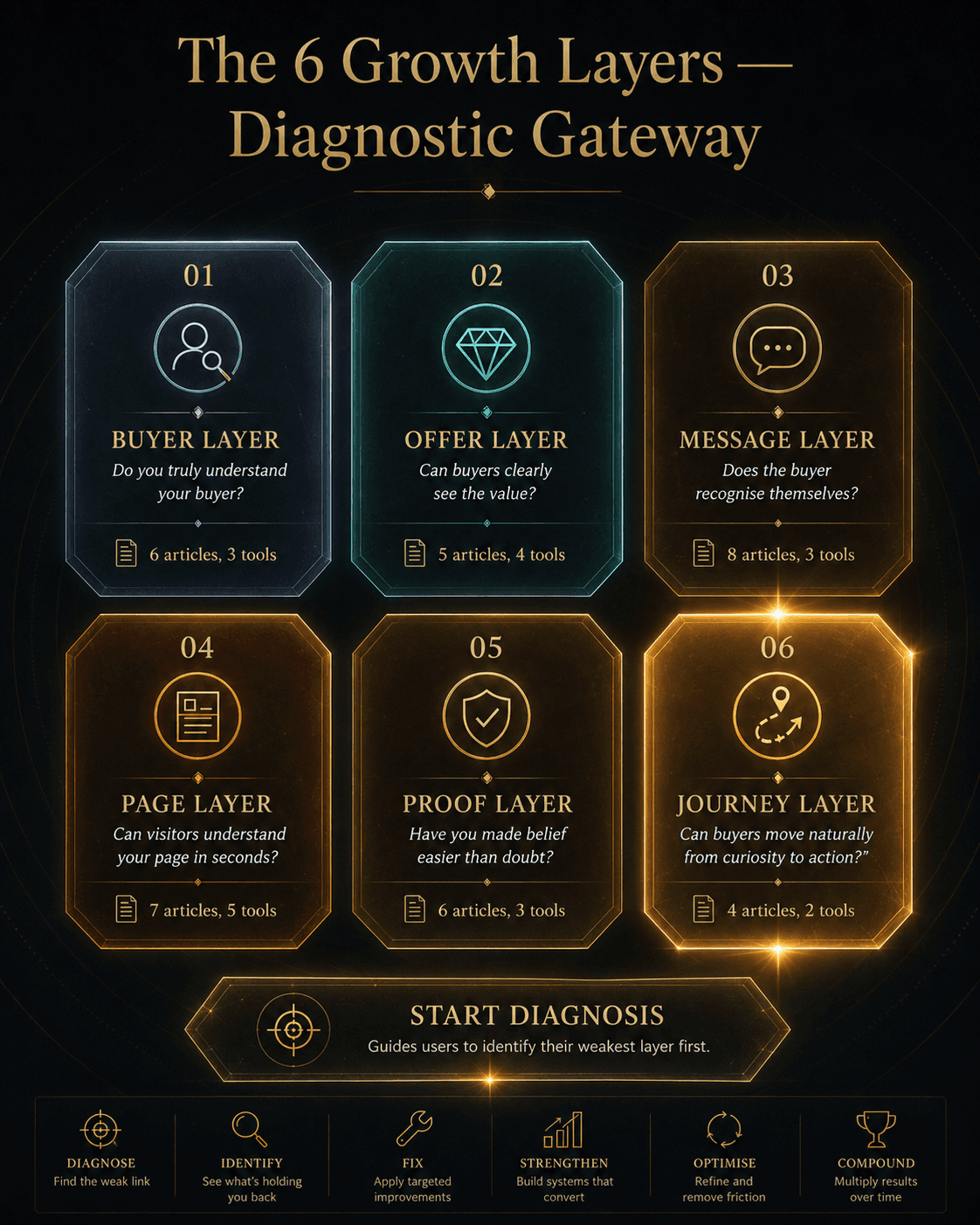
“The 6 Growth Layers — Diagnostic Gateway” Concept: A minimalist, 6-panel grid or hexagonal dashboard. Each panel represents one growth layer with an icon, core question, and resource count:  Panel 1 (Buyer Layer): Icon: magnifying glass/person — Question: “Do you truly understand your buyer?” — Resources: 6 articles, 3 tools — Cool grey/blue  Panel 2 (Offer Layer): Icon: diamond/offer — Question: “Can buyers clearly see the value?” — Resources: 5 articles, 4 tools — Soft teal  Panel 3 (Message Layer): Icon: speech bubble — Question: “Does the buyer recognise themselves?” — Resources: 8 articles, 3 tools — Warm amber  Panel 4 (Page Layer): Icon: document/layout — Question: “Can visitors understand your page in seconds?” — Resources: 7 articles, 5 tools — Deep orange  Panel 5 (Proof Layer): Icon: shield/evidence — Question: “Have you made belief easier than doubt?” — Resources: 6 articles, 3 tools — Dark gold  Panel 6 (Journey Layer): Icon: path/arrows — Question: “Can buyers move naturally from curiosity to action?” — Resources: 4 articles, 2 tools — Glowing bright gold  Style: Glass-morphism, dark background. Each panel is a translucent card with gold foil text. The layout feels like a high-end diagnostic gateway.  Interaction: Hovering any panel expands a detailed preview of the resources available in that layer, including key articles and tools. Clicking the panel navigates to that layer’s resource section. A “Start Diagnosis” button guides users through a questionnaire to identify their weakest layer first.
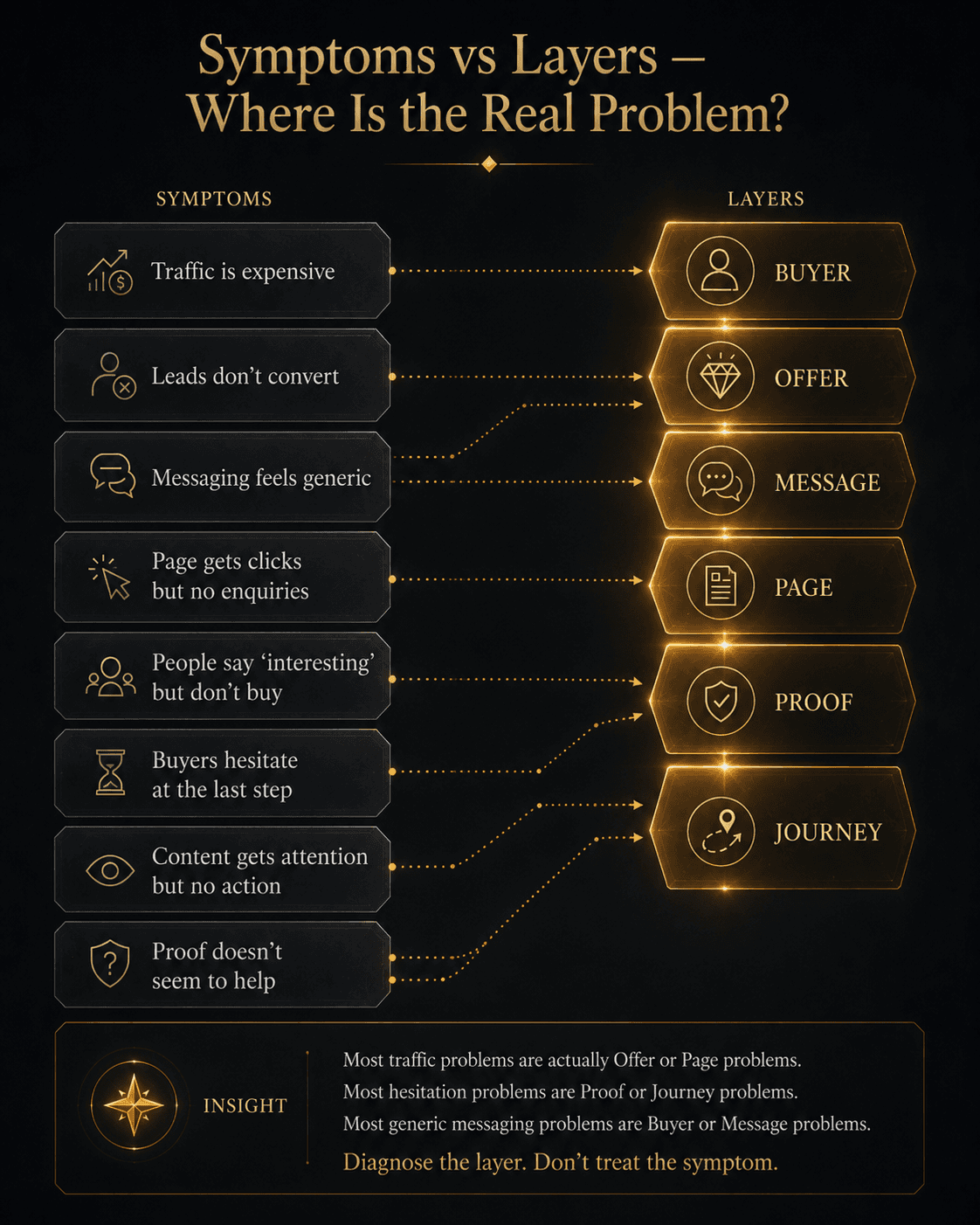
“Symptoms vs Layers — Where Is the Real Problem?” Concept: A minimalist, diagnostic matrix or mapping tool. The interface shows:  Left side (Symptoms): Common growth symptoms listed as cards:  “Traffic is expensive”  “Leads don’t convert”  “Messaging feels generic”  “Page gets clicks but no enquiries”  “People say ‘interesting’ but don’t buy”  “Buyers hesitate at the last step”  “Content gets attention but no action”  “Proof doesn’t seem to help”  Right side (Layers): The 6 layers as glowing icons. A dotted arrow connects each symptom to its most likely layer(s).  Below: A diagnostic insight: “Most traffic problems are actually Offer or Page problems. Most hesitation problems are Proof or Journey problems. Most generic messaging problems are Buyer or Message problems. Diagnose the layer. Don’t treat the symptom.”  Style: Luxury UI meets diagnostic matrix. Dark background, gold dotted lines, symptom cards in desaturated grey, layer icons in gold.  Interaction: Hovering any symptom highlights the most likely layer(s) causing it. Hovering any layer shows the symptoms it typically creates. Clicking a symptom opens a “Start Here” guide for that problem area.
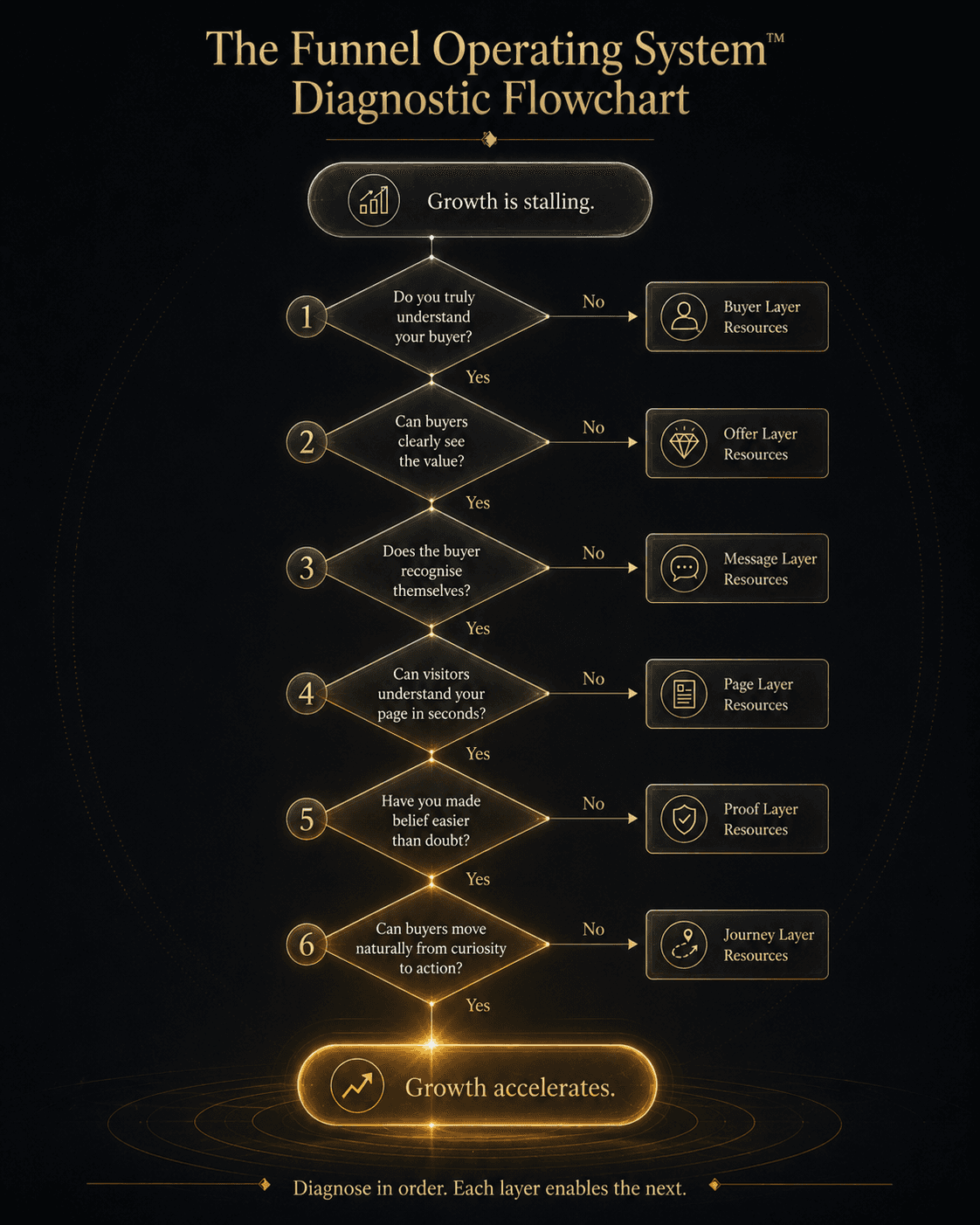
“The Funnel Operating System™ Diagnostic Flowchart” Concept: A minimalist, elegant flowchart showing the diagnostic sequence.  Start: “Growth is stalling.” — Cool grey  Decision Diamond 1: “Do you truly understand your buyer?” — If No → Buyer Layer Resources  Decision Diamond 2: “Can buyers clearly see the value?” — If No → Offer Layer Resources  Decision Diamond 3: “Does the buyer recognise themselves?” — If No → Message Layer Resources  Decision Diamond 4: “Can visitors understand your page in seconds?” — If No → Page Layer Resources  Decision Diamond 5: “Have you made belief easier than doubt?” — If No → Proof Layer Resources  Decision Diamond 6: “Can buyers move naturally from curiosity to action?” — If No → Journey Layer Resources  End: “Growth accelerates.” — Glowing bright gold  A thin gold arrow flows through the flowchart. A label: “Diagnose in order. Each layer enables the next.”  Style: Architectural flowchart meets luxury UI. Dark background, gold diamonds, thin connecting lines, cool grey to bright gold gradient.  Interaction: Hovering any decision diamond expands the diagnostic questions for that layer and shows the recommended starting resource. Clicking the diamond navigates to that layer’s section. A “Run Full Diagnosis” button guides users through all 6 questions sequentially.
“The 6 Growth Layers — Diagnostic Gateway” Concept: A minimalist, 6-panel grid or hexagonal dashboard. Each panel represents one growth layer with an icon, core question, and resource count:  Panel 1 (Buyer Layer): Icon: magnifying glass/person — Question: “Do you truly understand your buyer?” — Resources: 6 articles, 3 tools — Cool grey/blue  Panel 2 (Offer Layer): Icon: diamond/offer — Question: “Can buyers clearly see the value?” — Resources: 5 articles, 4 tools — Soft teal  Panel 3 (Message Layer): Icon: speech bubble — Question: “Does the buyer recognise themselves?” — Resources: 8 articles, 3 tools — Warm amber  Panel 4 (Page Layer): Icon: document/layout — Question: “Can visitors understand your page in seconds?” — Resources: 7 articles, 5 tools — Deep orange  Panel 5 (Proof Layer): Icon: shield/evidence — Question: “Have you made belief easier than doubt?” — Resources: 6 articles, 3 tools — Dark gold  Panel 6 (Journey Layer): Icon: path/arrows — Question: “Can buyers move naturally from curiosity to action?” — Resources: 4 articles, 2 tools — Glowing bright gold  Style: Glass-morphism, dark background. Each panel is a translucent card with gold foil text. The layout feels like a high-end diagnostic gateway.  Interaction: Hovering any panel expands a detailed preview of the resources available in that layer, including key articles and tools. Clicking the panel navigates to that layer’s resource section. A “Start Diagnosis” button guides users through a questionnaire to identify their weakest layer first.
“Symptoms vs Layers — Where Is the Real Problem?” Concept: A minimalist, diagnostic matrix or mapping tool. The interface shows:  Left side (Symptoms): Common growth symptoms listed as cards:  “Traffic is expensive”  “Leads don’t convert”  “Messaging feels generic”  “Page gets clicks but no enquiries”  “People say ‘interesting’ but don’t buy”  “Buyers hesitate at the last step”  “Content gets attention but no action”  “Proof doesn’t seem to help”  Right side (Layers): The 6 layers as glowing icons. A dotted arrow connects each symptom to its most likely layer(s).  Below: A diagnostic insight: “Most traffic problems are actually Offer or Page problems. Most hesitation problems are Proof or Journey problems. Most generic messaging problems are Buyer or Message problems. Diagnose the layer. Don’t treat the symptom.”  Style: Luxury UI meets diagnostic matrix. Dark background, gold dotted lines, symptom cards in desaturated grey, layer icons in gold.  Interaction: Hovering any symptom highlights the most likely layer(s) causing it. Hovering any layer shows the symptoms it typically creates. Clicking a symptom opens a “Start Here” guide for that problem area.
“The Funnel Operating System™ Diagnostic Flowchart” Concept: A minimalist, elegant flowchart showing the diagnostic sequence.  Start: “Growth is stalling.” — Cool grey  Decision Diamond 1: “Do you truly understand your buyer?” — If No → Buyer Layer Resources  Decision Diamond 2: “Can buyers clearly see the value?” — If No → Offer Layer Resources  Decision Diamond 3: “Does the buyer recognise themselves?” — If No → Message Layer Resources  Decision Diamond 4: “Can visitors understand your page in seconds?” — If No → Page Layer Resources  Decision Diamond 5: “Have you made belief easier than doubt?” — If No → Proof Layer Resources  Decision Diamond 6: “Can buyers move naturally from curiosity to action?” — If No → Journey Layer Resources  End: “Growth accelerates.” — Glowing bright gold  A thin gold arrow flows through the flowchart. A label: “Diagnose in order. Each layer enables the next.”  Style: Architectural flowchart meets luxury UI. Dark background, gold diamonds, thin connecting lines, cool grey to bright gold gradient.  Interaction: Hovering any decision diamond expands the diagnostic questions for that layer and shows the recommended starting resource. Clicking the diamond navigates to that layer’s section. A “Run Full Diagnosis” button guides users through all 6 questions sequentially.

Other Projects

Other Case Studies

Check our other project case studies with detailed explanations
Other Projects

Other Case Studies

Check our other project case studies with detailed explanations

Create a free website with Framer, the website builder loved by startups, designers and agencies.